Set up your data pipeline
Real-time DeFi data moves too fast for static snapshots. If you are building a trading bot, a monitoring dashboard, or an alert system, you need a live feed, not a delayed API response. Setting up this pipeline correctly is the foundation of your entire operation.
1. Choose your node provider
You cannot build a reliable DeFi stream without a stable connection to the blockchain. Running your own node is the gold standard for control and cost, but it requires significant hardware and maintenance. For most developers, a managed node provider like QuickNode or Alchemy offers the best balance of speed and ease of use.
These providers give you access to high-throughput endpoints that handle the heavy lifting of syncing blocks. They also offer WebSocket support, which is essential for real-time streaming. Without WebSockets, you would have to poll the blockchain repeatedly, wasting resources and introducing latency.
2. Select your data source
Once you have a node, you need to decide what data to stream. The Ethereum Foundation defines DeFi broadly, but your application likely focuses on specific protocols like Uniswap or Aave. You can subscribe to events directly from these smart contracts or use a specialized indexer like The Graph to aggregate data across multiple chains.
Direct contract events are the most accurate source but require you to parse raw logs. Indexers provide structured data that is easier to query but may have a slight delay. For real-time trading, direct events are usually preferred. For portfolio tracking, an indexer might be sufficient.
3. Build the streaming layer
Your application needs to listen for new blocks and filter the events that matter. Use a WebSocket connection to maintain an open channel with your node provider. This allows you to receive data the moment it is included in a block, rather than waiting for a periodic check.
Implement a message queue like Redis or Kafka to handle the incoming data stream. This decouples your data ingestion from your application logic, ensuring that a spike in transaction volume does not crash your server. It also allows you to replay data if your system goes down.
4. Store and index the data
Raw blockchain data is not query-friendly. You need to store it in a database that supports fast lookups. PostgreSQL is a solid choice for relational data, while TimescaleDB is better for time-series data like price feeds or transaction volumes.
Index the fields you query most often, such as token addresses, user wallets, and timestamps. This reduces query time from seconds to milliseconds, which is critical for real-time applications. Without proper indexing, your database will become a bottleneck as your data grows.
5. Monitor and maintain
A data pipeline is only as good as its uptime. Set up alerts for dropped connections, high latency, or failed parses. Monitor the health of your node provider and have a backup endpoint ready to switch to if the primary fails.
Regularly review your data quality. Are you missing events? Is your parser handling edge cases correctly? Small errors in data ingestion can lead to significant financial losses in DeFi. Treat your pipeline with the same rigor as your trading strategy.
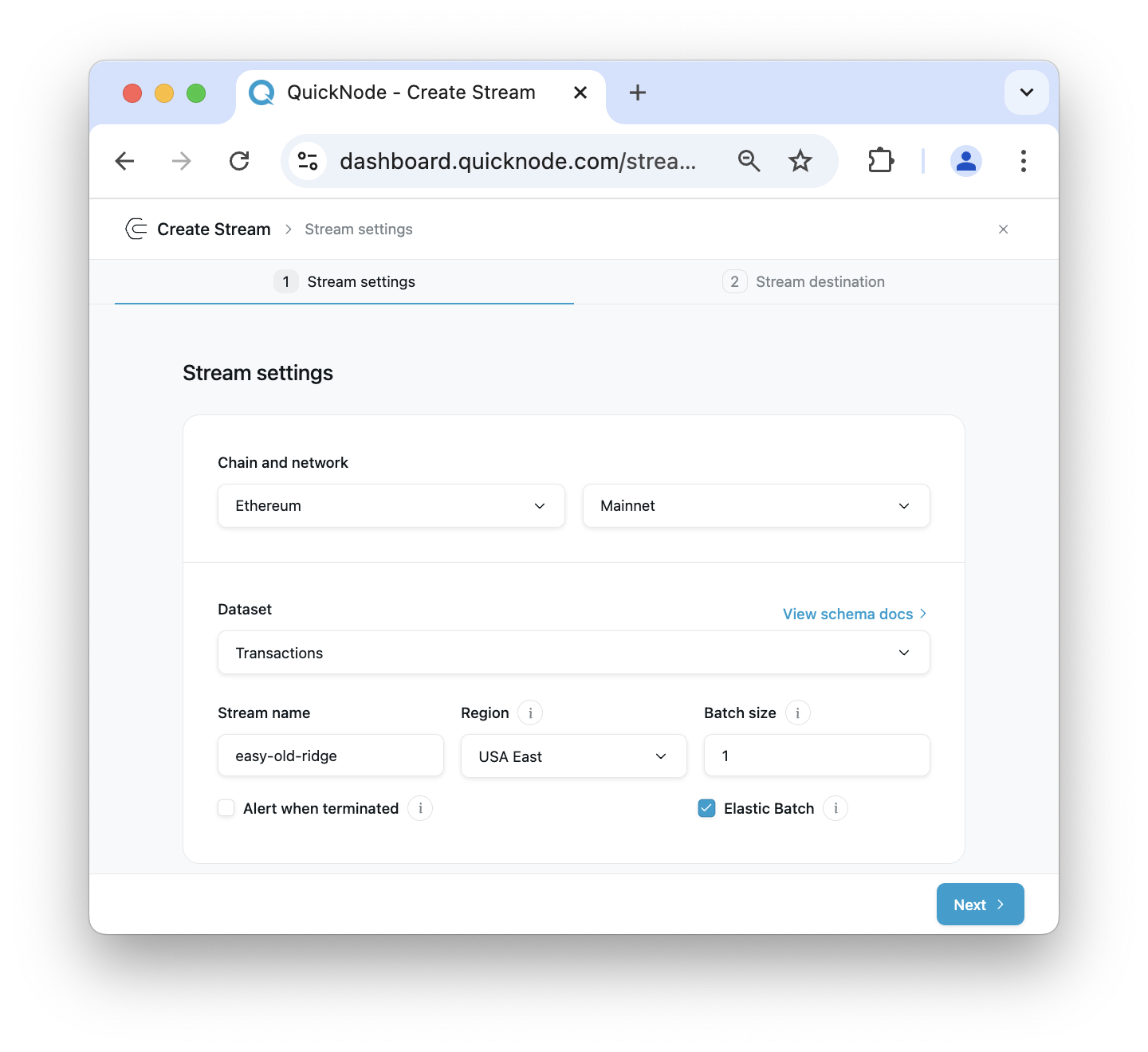
Select a managed node provider like QuickNode or run your own. Prioritize WebSocket support for real-time capabilities.
Decide between direct smart contract events for accuracy or an indexer like The Graph for ease of use.
Implement a WebSocket listener and a message queue like Redis to handle incoming events without blocking.
Use a time-series database like TimescaleDB and index key fields for fast querying.
Set up alerts for downtime and latency. Regularly audit data quality to prevent financial errors.
Compare stream infrastructure providers
The easiest mistake with DeFi Stream is comparing options on the most visible detail while ignoring the day-to-day constraint. A choice can look strong on paper and still fail because it is too hard to maintain, too expensive to repeat, or awkward in the actual setting. Use the same checklist for every option: fit, cost, durability, timing, upkeep, and fallback plan. That keeps the comparison practical instead of drifting into preference alone.
| Factor | What to check | Why it matters |
|---|---|---|
| Fit | Match the option to the primary use case. | A good deal still fails if it does not fit the job. |
| Condition | Verify age, wear, and service history. | Hidden condition issues erase upfront savings. |
| Cost | Compare purchase price with likely upkeep. |
Execute your first live trade
Streaming money on-chain works differently than a standard swap. Instead of a single transaction that settles instantly, a DeFi stream sends value continuously over time. Think of it like a digital faucet: you set a rate (e.g., 1 ETH per hour), and the protocol releases small chunks of tokens to the recipient every second until you stop it or reach a cap.
To execute this, you need a wallet that supports streaming protocols (like Sablier or Superfluid) and a blockchain that supports these smart contracts. Ethereum L2s are often preferred for lower gas costs, as streaming involves frequent micro-updates.
The beauty of this process is transparency. Both sender and recipient can see the exact balance at any second. If you need to stop early, you can cancel the stream, and any unstreamed funds remain in your wallet. However, funds already streamed are with the recipient. Always test with a small amount first to understand the gas fees and interface flow on your chosen network.
Avoid common stream data pitfalls
DeFi streaming promises real-time precision, but it introduces unique risks that static data doesn't have. Latency arbitrage and data manipulation can turn a split-second advantage into a significant loss. High-stakes users must treat data feeds not as passive information, but as active infrastructure that requires verification.
Latency arbitrage
Latency arbitrage occurs when a trader exploits the time delay between when a price moves on-chain and when that data reaches your dashboard or trading bot. In fast-moving markets, this window can be microseconds long. If your data stream lags, you might execute trades based on stale prices, effectively trading against automated market makers who see the truth first.
To mitigate this, prioritize direct node connections over third-party aggregators for critical execution logic. Third-party APIs often batch updates or introduce processing overhead that adds unwanted delay. If you are building a bot, test your end-to-end latency rigorously before deploying capital.
Data manipulation and feed integrity
Not all on-chain data is created equal. Some protocols or oracles can be manipulated, especially in lower-liquidity pools or during periods of extreme volatility. A "real-time" price feed might reflect a single, large, artificial transaction rather than genuine market consensus. Relying on a single source for such data is dangerous.
Always cross-reference critical price data with at least two independent sources. Look for consensus mechanisms in your data provider's documentation. If a feed claims to be "real-time," check how it handles reorgs or finality delays. Unverified data feeds can lead to liquidations or failed transactions that cost you gas fees and principal.
Handling reorgs and finality
Blockchain reorganizations (reorgs) can invalidate recent blocks, causing your stream to suddenly "rewind." If your application acts on unconfirmed data, you might execute trades that are later rejected by the network. This is particularly relevant for Ethereum and other proof-of-stake chains where finality is not instantaneous.
Design your logic to wait for a specific number of confirmations before executing high-value trades. For most DeFi interactions, waiting for 12-30 confirmations provides a safe buffer against reorgs. Balance this safety with your need for speed; if you are trading highly volatile assets, you may need to accept a higher risk of reorg for faster execution, but never ignore it entirely.
Verify your strategy with live charts
Static price history is a rear-view mirror. Real-time DeFi streams let you see the road ahead. To validate a trading decision, you need to see how your strategy reacts to live data, not just past closes.
Start by connecting a streaming data feed to a technical analysis platform. Most professional setups use TradingView or similar tools that ingest live oracle data. This ensures your indicators update with every block or price tick, not just at the end of an hour. Look for divergence between the stream price and your indicators. If the price is rising but the Relative Strength Index (RSI) is falling, the momentum is fading. This is a common signal to tighten your stop-loss or take profits before the stream reverses.
Use the live chart to backtest your entry points in real-time. Watch how your strategy performs as the stream updates. If the logic holds up under live volatility, you can proceed with confidence. If it breaks, adjust your parameters before risking capital.
Frequently asked questions about DeFi streams
Helpful gear
Use these product recommendations as a starting point, then choose the size, material, and price point that fit how you actually use the gear.


As an Amazon Associate, we may earn from qualifying purchases.
No comments yet. Be the first to share your thoughts!